
Skills System
Skills are the fundamental building block of UK Legal Skills. Each skill is a self-contained markdown prompt that instructs an agent host how to analyse a specific type of legal document or perform a specific legal task.
Skill File Structure
Every skill lives in its own directory under skills/. The full register is 38 skills — the canonical source is registry/skill-registry.json, enforced by scripts/audit_skills.mjs.
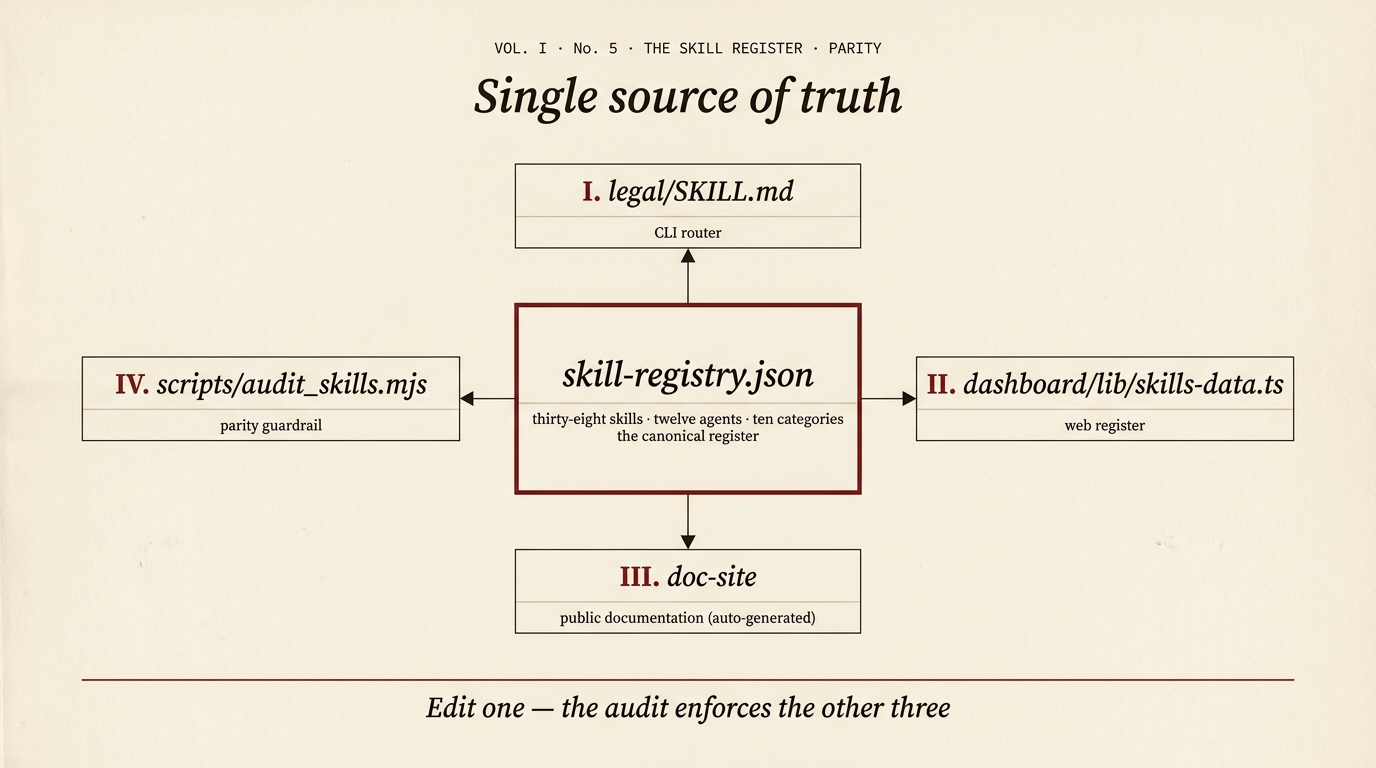
Mermaid source — the diagram above is generated from this
flowchart TB
  REG["<strong>skill-registry.json</strong><br/>38 skills · 12 agents · 11 categories"]
  N["I · legal/SKILL.md (CLI router)"]
  S["II · doc-site (public docs, auto-generated)"]
  W["III · scripts/audit_skills.mjs (parity guardrail)"]
  REG --- N
  REG --- S
  REG --- W
Edit one — the audit enforces the other three.
skills/
├── legal-review/SKILL.md            ← orchestrator (5 parallel agents)
├── legal-employment/SKILL.md        ← orchestrator (4 parallel agents)
├── legal-corporate/SKILL.md         ← orchestrator (3 parallel agents)
└── legal-*/SKILL.md                 ← 35 single-agent or utility skills
For the complete, up-to-date list of skills, run scripts/audit_skills.mjs or read registry/skill-registry.json. The list is intentionally not duplicated here so it cannot drift.
Anatomy of a SKILL.md
Each SKILL.md file contains these sections:
1. YAML Frontmatter
---
name: Contract Review
description: Full contract review with 5 parallel agents
---
2. Jurisdiction Pin
Every skill explicitly states: England & Wales only. This prevents the AI from drifting into Scottish or Northern Irish law.
3. Disclaimer Block
The standard AI-generated analysis disclaimer appears in every skill, ensuring it is included in all output.
4. Purpose Statement
What the skill does, what document types it handles, and what the user can expect.
5. Input Handling
Skills accept input in three ways:
| Method | How It Works |
|---|---|
| File path | The Read tool reads the file directly from disk |
| Pasted text | User pastes the document content into the chat |
| URL | WebFetch retrieves the document from a URL |
TIP
This input trichotomy is consistent across all skills. When editing ingestion phases, always preserve all three options.
6. Analysis Framework
The core of the skill -- structured phases that guide the model through the analysis. For example:
- Phase 1: Ingestion -- classify the document type, extract metadata
- Phase 2: Analysis -- clause-by-clause review, risk scoring, compliance checks
- Phase 3: Synthesis -- aggregate findings, calculate scores, generate recommendations
7. Output Format Template
A detailed template specifying the exact structure of the output, including section headings, table formats, scoring displays, and recommendation layouts.
8. File Naming Convention
The pattern for saving the output file:
CONTRACT-REVIEW-[name]-[YYYY-MM-DD].mdThe Orchestrator
The main orchestrator at legal/SKILL.md is the entry point for all /legal commands. It contains:
- Command menu -- displayed when users type
/legalwithout arguments - Routing table -- maps each command to its skill directory
- Input handling rules -- the three-way input trichotomy
- File naming conventions -- standardised output file names
- Disclaimer -- the standard disclaimer text
- Tone and style guide -- professional but accessible, with risk indicators
Key Design Principles
Self-Contained
Each skill is a complete, standalone prompt. There is no shared library, no imported modules, no runtime code. You can read a single SKILL.md file and understand everything about that skill.
No Runtime Dependencies
Skills are pure markdown. They require only a compatible agent host to run -- no package installation, no build step, no configuration.
Consistent Structure
All skills follow the same structural pattern, making them predictable to read, edit, and extend.
Adding a New Skill
To add a new /legal command:
- Create the directory:
skills/legal-yourskill/ - Write
SKILL.mdfollowing the standard structure - Update the routing table in
legal/SKILL.md - Run
./install.shto deploy
See the Adding Skills guide for detailed instructions.